Enter your 11-digit Account ID in the given bar and click the Check Bill button. Within a few seconds, our system will retrieve your bill information from the SNGPL portal, and you can view your SNGPL bill details online. Sui Gas Bill are for SNGPL and SSGC Users.
Get Sui Gas SNGPL Bill
Enter your consumer number to view your sui gas bill
Please enter a valid consumer number (digits only).
Your bill was opened in a new tab. If nothing appeared, your browser may have blocked the pop-up — allow pop-ups for this site and try again.
If you are an SNGPL consumer living in the northern areas of Pakistan, including Punjab, KPK, Islamabad, and Azad Jammu & Kashmir, you can use our portal to check your bill if you have lost your paper bill, have not received the current month’s bill, or simply want to check the bill before receiving the paper copy. This is the easy way for sui nadran gas bill online check. All Latest months sui nadran gas bill online are availble. For SSGC users, Check SSGC Bill.
How to Check SNGPL Bill Online?
The SNGPL bill online bill check process is straightforward. You only need the account number printed on an earlier bill.
Follow these steps:
- Go to the SNGPL bill checker above.
- Enter your 11-digit Account ID.
- Click Check Bill.
- Wait for the bill information to load.
- Review the billing month, amount due, due date and other available details.
It is better to keep your old bill with you while entering the Account ID so that you do not enter any wrong digit.
What Is the SNGPL Account ID?
In SNGPL bill check online account ID, the Account ID is the number associated with your SNGPL gas connection. This 11-digit number is required to identify your particular consumer account when checking your bill online.
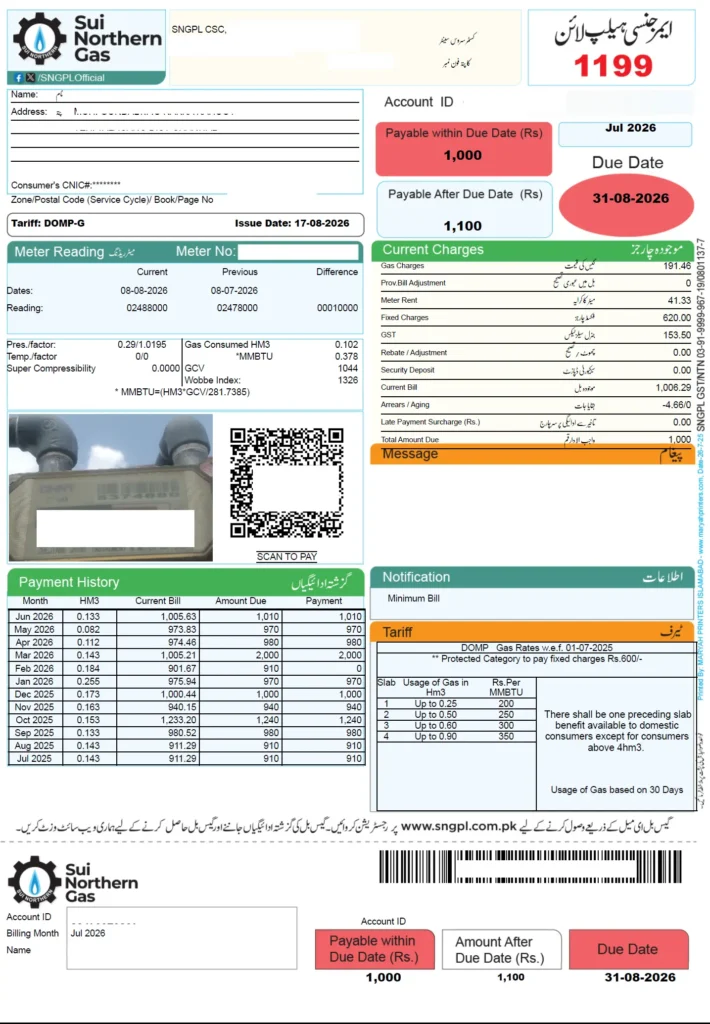
You can find this number at the top-right side of your SNGPL bill. You need this Account ID to fetch your bill online through the SNGPL portal.
Can You Check the Bill Using a Reference Number?
You may have seen phrases such as SNGPL bill online check by reference number or SNGPL online bill check 14 digit while searching for a way to check your bill. These phrases can confuse anyone who wants to check their SNGPL bill online.
This confusion comes from checking electricity bills where we need to enter a 14-digit reference number to check the bill online. However, for our SNGPL bill checker, you only need the 11-digit SNGPL Account ID mentioned at the top of your SNGPL bill.
The official website of Sui Northern Gas Pipelines is a time-consuming option for checking your bill. First, you have to go to the homepage, scroll down to find the online bill check option, enter your Account ID, and complete the CAPTCHA before accessing your bill. Moreover, the website often faces occasional downtime or slow loading.
Compared with this, our portal is faster but at the same time secure as well. Enter the 11 digit account ID, and there you get your bill.
Checking the Bill Through SNGPL Bill App
If you want to manage your monthly utility bills, you can download SNGPL ConnectOn for your Sui Gas bills. This is an official SNGPL bill check app to apply for a new connection, check the status of an existing connection application, and view or download your bill details.
For iPhone users, the official app is available on the App Store: SNGPL Consumer Information
While searching for an SNGPL bill app, make sure that you are reaching an SNGPL official app. Many third-party bill-checking apps are also available on app stores, so check the developer and app details before entering your personal or account information.
What Information Can You See on the Bill?
On your SNGPL bill, you can see the current bill amount, which is calculated by adding
- Gas charges,
- Previous bill adjustments (if any),
- Meter rent,
- Fixed charges( Rs 600 for protected category)
- GST,
- Rebate adjustments (if any), and
- Security deposit. If there are any arrears, they are also added to calculate the final amount payable.
You can also see the current meter reading, previous month’s reading, and the difference between the two on the left side of the bill. At the bottom-right side, you can find the 12-month bill history, with which you can analyze your gas consumption over time.
To check the applicable gas slab rates, you can see the slab rate table shown on the right side of the bill. At the bottom-right side, you can also see the amount payable within the due date and the amount payable after the due date.
What If You Have Lost Your Original Bill?
If you have lost your original paper bill, there is no need to worry. This is where an SNGPL bill duplicate becomes useful. A duplicate bill is another copy of your billing information that you can view, save, or print through our online bill checker portal.
You may need a duplicate if:
- The paper bill was lost.
- You never received it.
- The bill was damaged.
- You want to check the amount before the due date.
- You want a copy for your personal records.
- You need a printed copy for payment or documentation.
After checking the SNGPL consumer bill, you can either take a screenshot or download it as a PDF and print it whenever you need a physical copy.
How to Get SNGPL Online Bill Check Print?
To get the SNGPL bill duplicate download PDF, save the bill after opening it.
On a computer, open the bill and press Ctrl + P. Your browser will show the printing options. Save it as PDF. Choose the location where you want to save the file, and click Save.
On a mobile phone, the exact options depend on the operating system of that phone. Look for Print, Share, or a similar option in your browser menu.
You can also print the bill directly if your device is connected to a printer. In this way you can easily get the paper copy of the bill.
What If Your Bill Is Not Showing?
If you are not getting your online bill through our portal, first make sure that you have entered all 11 digits of your Account ID correctly. Even if one digit is missing or incorrect, then your bill will not appear.
If after rechecking the number, your bill is still not showing, it is better to contact the SNGPL helpline for assistance.
Customer Service SNGPL Helpline: 1199
Alternate SNGPL Helpline Number: 0800-77377
You can also contact or visit the SNGPL head office using the following details:
- SNGPL Head Office Address: 21 Kashmir Road, P.O. Box 56, Lahore, Pakistan
- SNGPL Telephone: +92 42-99083732
- SNGPL Fax: +92 42 99201369
- Email: info@sngpl.com.pk
- Website: SNGPL Official Website
You can use these official contact channels to submit a complaint or get assistance regarding your gas connection, billing issues, or other SNGPL services.
How to Pay Your SNGPL Gas Bill
After checking and confirming your bill amount, you can pay your SNGPL bill through online or offline methods. For online payment, you have several options, including mobile apps, internet banking, and other digital payment services. Common options include:
- SNGPL ConnectOn App
- Easypaisa
- JazzCash
- UPaisa
- Internet Banking
- Mobile Banking
- ATM Payment
- Designated Bank Branches
For offline payment, you can pay your bill at post offices, participating bank branches, or SNGPL-designated collection centers.
FAQs
How can I download my SNGPL bill?
After opening your bill, you can save it in PDF format by using the download or print option. If you want a hard copy, simply select the Print option and print the bill.
Can I check my SNGPL bill without the paper copy?
Yes, you can check your online bill if you have your old bill copy with you and know your Account ID. If you do not have either your current or an old bill, you must know your exact Account ID to access your bill online. Without the correct Account ID, you cannot fetch your bill through the SNGPL bill checker.
Can I check an SNGPL bill on my phone?
Yes, you can use our portal on your phone to check your SNGPL bill. You can also use the official SNGPL ConnectOn app to view their bill and access other SNGPL services.
What should I do if my bill is not found?
First, check that you have entered all 11 digits correctly. If you still cannot access your bill then contact the SNGPL helpline using the numbers given above.
Can I check SNGPL bill by CNIC?
No. You cannot check your SNGPL bill using your CNIC. The main requirement for checking your bill online is the 11-digit Account ID mentioned at the top-right corner of your SNGPL bill.
Final Words
You do not have to wait for a paper copy to find out your monthly gas charges. With our secure and fast online SNGPL bill checking facility, you can access your available bill.
What you need is just to type your 11-digit Account ID in the given bar above and click Check Bill. Once the bill appears, review the amount, due date, consumption and other details.
If the original bill is lost, you can use the online copy as your SNGPL duplicate bill, and if you need a physical or digital copy, use the browser’s print option to print it or save it as a PDF.